
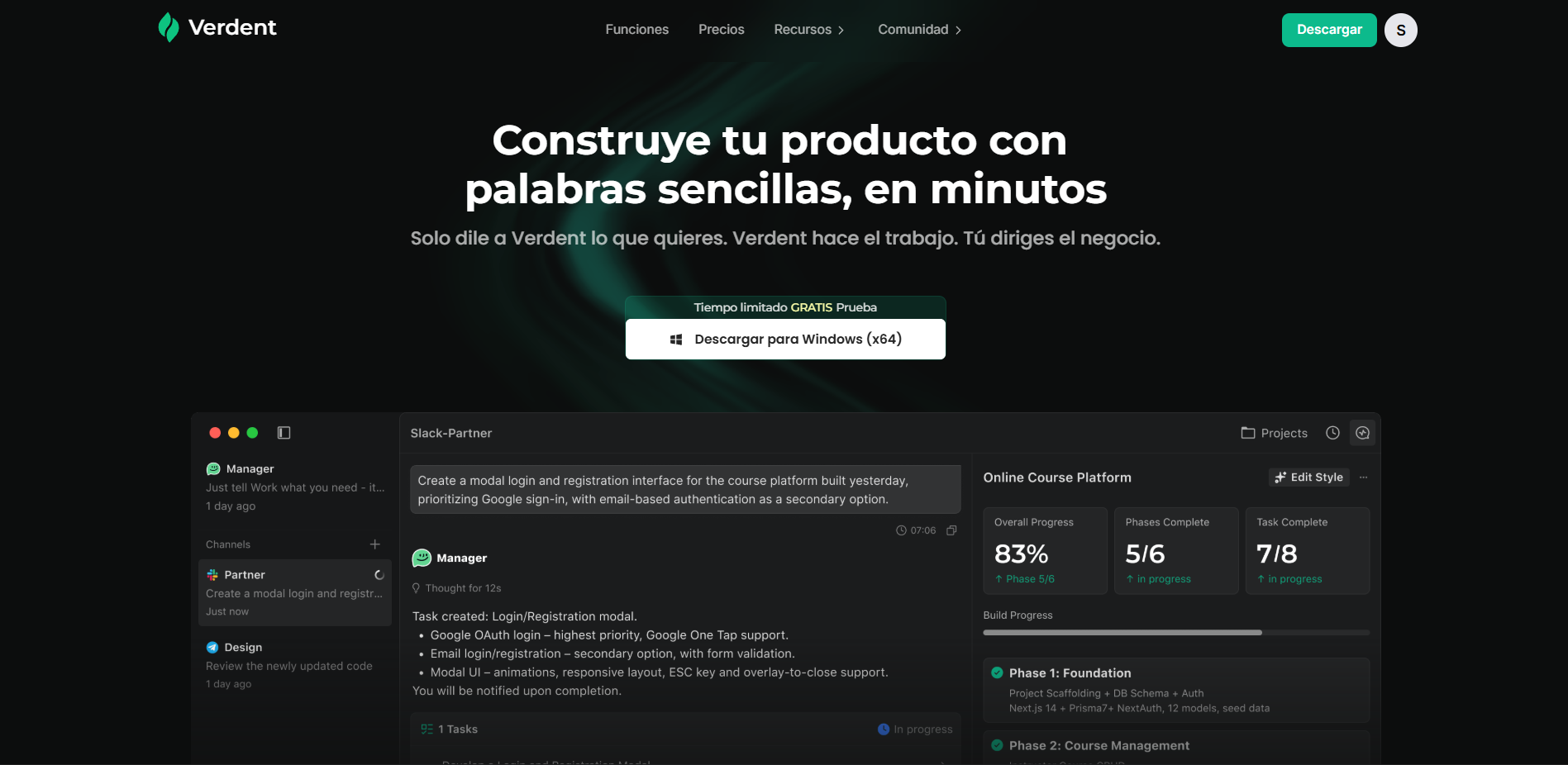
What Verdent is
Verdent calls itself “your AI technical co-founder”. You describe what you want to build in plain language and it plans the work, writes the code, tests it and iterates until the thing runs.
It is not a chat that returns snippets. It is an autonomous agent that splits a goal into phases, runs them in parallel, and hands you something you can ship. Its core product, the Manager, works like a project lead: it breaks the job into subtasks, puts them on a Kanban board, and works through them without you hovering over it.
The company behind it is Verdent AI, Inc., and the oldest material on their blog is from October 2025, so this is a young product.
Plans and pricing
| Plan | Price | Credits/mo |
|---|---|---|
| Free | $0 | 100 (7-day trial) |
| Lite | $5/mo | Eco Mode only, no credits |
| Starter | $19/mo | 480 (320 base + 160 temporary bonus) |
| Pro | $59/mo | 1,500 (1,000 + 500 bonus) |
| Max | $179/mo | 4,500 (3,000 + 1,500 bonus) |
| Teams | $20/user/mo | 480 per user |
Monthly billing only. There is no annual discount, unusual in this category and a point against Verdent versus rivals that do offer one.
There’s a 40% welcome discount for the first month, with a countdown inside the app: Starter for $11.40, Pro for $35.40, Max for $107.40. That’s the first month only, not the plan’s real price.
Watch out for the 50% bonus
The credits advertised on each plan include a temporary bonus. The real base amounts are 320, 1,000 and 3,000, not 480, 1,500 and 4,500. Verdent promises 15 days’ notice before removing it, but if you subscribe expecting 480 credits, sooner or later you will have 320.
Subscription credits expire
This is the detail that costs the most money and gets read the least: subscription credits do not roll over month to month. Whatever you don’t spend, you lose. Credits bought separately as top-ups, by contrast, never expire.
Top-ups run from $20 for 340 credits to $200 for 3,400, at a stated $0.059 per credit, which we verified in our own account’s panel.
As a counterweight, there’s a subscription streak: each consecutive billing cycle adds a bonus, from +10% the first month up to +20% from the sixth month on. Cancel or miss a payment and the streak resets to zero.
What it actually costs to use
This is what you will not find on their site, and the reason we tested it with a paid account instead of repeating the brochure.
Hover over any model in Verdent and it tells you how many “model requests” fit into 100 credits. For Opus 5 it says about 84, which sounds like a bit over one credit per request.
The reality is very different. These are exact figures from our own billing panel after a work session:
| Operation | Model | Tokens | Credits |
|---|---|---|---|
| Generate a video | dreamina-seedance-2-0 | 650,700 | 77.44 |
| Generate a video | dreamina-seedance-2-0 | 433,800 | 51.62 |
| Agent task | claude-opus-5 | 4,279,746 | 62.32 |
| Agent task | claude-opus-5 | 3,341,290 | 55.33 |
| Agent task | claude-opus-5 | 2,428,637 | 37.78 |
| Agent task | claude-opus-5 | 1,683,051 | 29.01 |
| Agent task | claude-opus-5 | 683,987 | 8.16 |
| Generate an image | gpt-image-2 | 6,736 | 2.26 |
| Generate an image | gpt-image-2 | 1,446 | 0.27 |
| Improve a prompt | claude-haiku-4-5 | ~9,000 | 0.20 |
Every agent run recorded in billing cost between 8 and 62 credits, averaging around 34. Not 1.2. And this is not a misreading: a single log line spans between 680,000 and 4.3 million tokens, far too much for one model call. The fine print on their own panel explains it: “complex tasks may generate multiple internal requests.” Each line corresponds to between 7 and 52 of the “requests” the metric counts.
In practice: 480 Starter credits buy about 14 agent runs a month, not the 403 “requests” the interface implies. And if one of your jobs spans more than one run, the count drops further.
Worth being precise about this, because it matters: the app’s metric is not lying, it measures model requests. The problem is that a model request is not one of your tasks, and nothing in the interface says so except that footnote.
One more thing their site never mentions and we confirmed in our account: failed attempts consume credits too. If you dislike a result and ask for a redo, you pay for both. In a tool that invites iteration, that makes real usage notably more expensive than any pricing table suggests.
Our Starter plan ran out in one day
This is what you actually need to know before subscribing, and it’s why this review’s value-for-money score isn’t higher.
We built a landing page, asked for four design variants, generated about fifteen images for a menu and nine video clips. One day of work, no large projects, nothing resembling heavy professional use. The full monthly plan was gone.
Broken down from the billing log:
| Item | Credits | In dollars |
|---|---|---|
| 9 video generations | most of the spend | $25.8 to $77.4 each |
| 8 agent runs with Opus 5 | 273.1 | ~$16.11 |
| Images, prompt improvements, subagents | ~35 | ~$2.07 |
Two numbers sum up the problem. A single agent run cost 62.32 credits, or 13% of the entire monthly plan in one command. And video took up half of all visible spend.
The tool isn’t working badly. It’s working too well: the agent runs without brakes and the counter falls at the same rate. If you’re coming from flat subscriptions like ChatGPT or Claude, where you pay $20 and use it without thinking, the mental shift here is abrupt.
The setting that cuts your bill in half
And here’s the important part, because those 19 tasks can be multiplied.
Verdent ships configured with the Performance preset out of the box, which uses double the reference cost. The Balance preset uses between 0.32x and 0.67x, meaning 3 to 6 times less.
On Balance, those same tasks drop from 25 credits to between 4 and 8, and the 480 Starter credits go from 19 tasks to between 60 and 115.
Balance isn’t a watered-down mode: it uses Sonnet 5 as the agent and GPT-5.6 Terra for planning. For normal work the difference is barely noticeable. The sensible move is to leave it on Balance and only switch to Performance when Balance struggles.
That the tool ships switched to its most expensive mode without a warning is, in our view, the single most criticizable thing about the product.
Eco Mode is the safety net, and it works
And here’s the nuance that redeems the picture quite a bit, and we found it by hitting exactly zero.
Verdent has a second system, Eco Mode, that runs outside the credit system entirely. We tested it with an empty balance and the app kept working normally. The model picker says it plainly next to each compatible model: “doesn’t use credits.”
Instead of a balance it uses time quotas: a rolling 5-hour window and a weekly cap, both visible in the dashboard. They refill on their own once exhausted.
Available models are Kimi K3, Kimi K2.7 Code, Kimi K2.6, DeepSeek-V4-Flash, DeepSeek-V4-Pro, GPT-5.6 Luna, GLM-5.2 and MiniMax M3. The top tier is excluded: no Opus 5, no Fable 5, no GPT-5.6 Sol.
What you lose using it: it disables Smart Suggestions and automatic context compression, which is exactly what keeps long conversations manageable.
Where it works. We tested it in the desktop app. Verdent confirmed in writing that Eco Mode is also available on Verdent Cloud, the VS Code extension and the JetBrains plugin; we haven’t verified that last part ourselves.
How far it goes, measured. With a zero balance we asked for another complete landing page, this time for a gym, using Kimi K3 and Kimi K2.7 Code. It came out just as fast, and the billing log confirms it without ambiguity: every line tagged Eco Mode, 0 credits, including one agent run of 1.83 million tokens. That same amount on the paid tier with Opus 5 would have cost roughly 29 credits, about $1.72.
What it does consume are the quotas. After that site the dashboard showed:
| Quota | Remaining | Used by one site |
|---|---|---|
| 5-hour window | 67% | ~33% |
| Weekly | 92.9% | ~7% |
Translated: roughly 3 full sites per 5-hour window and about 14 a week, meaning roughly two a day sustained. For one person’s real work, that’s a lot more than it first appears.
But Eco Mode only covers code. We confirmed it with a zero balance: asking for an image returns a 402 Payment Required error and generates nothing. Image and video generation still depend on credits, with no Eco alternative.
That makes sense, since image and video models aren’t on the Eco list, but it’s worth knowing before you commit: if your plan was to use Verdent as a cheap visual generator, Eco Mode won’t save you.
Still, it changes the verdict on one important point: running out of credits doesn’t lock you out of coding. You still have an agent that writes code, with models that are more than enough for routine work. If you’re going to use Verdent daily, the sensible approach is to work in Eco by default and save credits for images, video, and whatever genuinely needs a top-tier model.
Put another way: the $5/mo Lite plan, which only includes Eco Mode, goes from looking like a filler tier to probably being the most sensible option in the whole catalogue for anyone who codes with the tool and doesn’t need image generation.
Video generation eats the budget
Verdent advertises video generation as just another feature. It isn’t: it’s by far the most expensive operation.
During testing we generated nine clips total: seven of ten seconds and two of five. In the log, the generations we could read individually cost between 25.81 and 77.44 credits each, averaging around 51.
Do the math and you’ll see why the plan didn’t survive a second day: video was, by a wide margin, the biggest credit sink of the whole session. With the 480 Starter credits, counting video alone, you don’t reach a dozen clips a month.
And there’s a nuance that makes the math worse: those weren’t nine good videos, they were nine attempts. Some clips didn’t convince us, we asked for redos, and every redo billed as a new generation.
For context: generating an image cost between 0.27 and 2.26 credits in our log. A video costs roughly 35 times more than an image.
If you came to Verdent looking for a video tool, this isn’t its territory.
What it generated in our test
We asked it, in Spanish, for a complete landing page for a café, with a menu, booking form and responsive design. This is what it returned, unedited on our part.
Four different design proposals

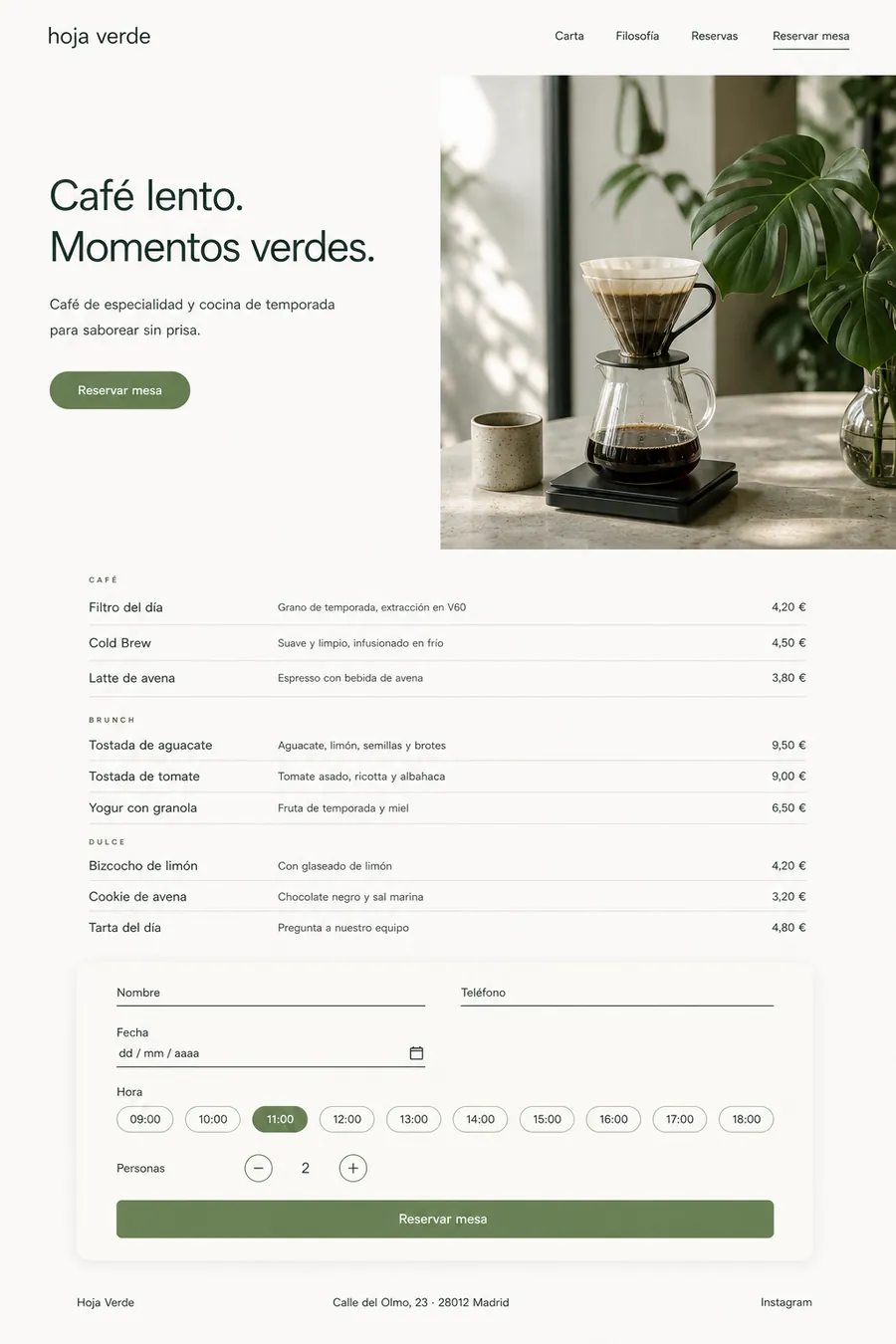



Click any of them to view full size.
Each with its own identity: a dark cocktail-bar one, an editorial one with numbered sections, another light and natural. These aren’t recycled templates with the colour swapped.
The two pages, running live
Instead of a static screenshot, we recorded both of them in full. Press play to see them working, animations and form included.
Worth comparing the two, because it’s the most honest test in this whole article: the one above cost credits and the one below cost nothing. There’s a quality difference, but it’s much smaller than the price gap suggests.
And the menu photos, generated too
Without leaving the app, it generated around fifteen images for the menu. Here are twelve of them:












In the log, each image cost between 0.27 and 2.26 credits depending on complexity, averaging around 1.3. All fifteen came out to about 20 credits, a little over a dollar. This is where the credit system works in your favour: compared with video, images are nearly free.
Three takeaways from testing
Spanish genuinely works. It’s not a translation: addresses are Spanish, prices use a comma decimal and the euro sign, phone numbers follow Spanish formatting, and the copy reads as written, not translated. This was our biggest doubt before testing it, and it’s resolved.
Visual quality and speed are the product’s best qualities. Pages come out well-resolved on the first try, in minutes. If you were picturing generic templates, that’s not what this is.
And the catch is the same one as always: it spends fast. That’s the other side of that same speed. The agent works without brakes and credits drop at the same rate results appear. The Balance preset reduces the problem a lot, but keep the counter in view.
The 22 models and what each one costs
One of its best decisions is showing the cost of every model before you use it. Here’s the full list, cheapest to most expensive:
| Model | Multiplier | Requests / 100 credits |
|---|---|---|
| DeepSeek-V4-Flash | 0.05x | ~2,000 |
| GPT-5.6 Luna | 0.07x | ~2,000 |
| Qwen3.7-Plus | 0.08x | ~1,750 |
| Gemini 3.5 Flash-Lite | 0.1x | ~1,400 |
| GPT-5.4 mini | 0.24x | ~584 |
| MiniMax M3 | 0.25x | ~560 |
| Haiku 4.5 | 0.33x | ~420 |
| DeepSeek-V4-Pro | 0.34x | ~420 |
| Kimi K2.7 Code | 0.4x | ~350 |
| Gemini 3.6 Flash | 0.48x | ~288 |
| GLM-5.2 | 0.55x | ~254 |
| Qwen3.8-Max | 0.58x | ~240 |
| GPT-5.4 | 0.61x | ~230 |
| GPT-5.3-Codex | 0.61x | ~230 |
| GPT-5.6 Terra | 0.64x | ~218 |
| Gemini 3.1 Pro | 0.65x | ~217 |
| Sonnet 5 | 0.67x | ~210 |
| Kimi K3 | 1x | ~140 |
| Sonnet 4.6 | 1x | ~140 |
| GPT-5.5 | 1.61x | ~87 |
| GPT-5.6 Sol | 1.61x | ~87 |
| Opus 5 / 4.8 / 4.7 / 4.6 | 1.67x | ~84 |
Three things worth knowing from this table:
The version number doesn’t indicate price. Qwen3.7-Plus costs 0.08x and Qwen3.8-Max costs 0.58x: seven times more. Sonnet 5 comes out cheaper than Sonnet 4.6.
Going down a version within Opus saves nothing. Opus 5, 4.8, 4.7 and 4.6 all cost exactly the same, 1.67x.
For daily coding, GPT-5.3-Codex. It’s described as optimized for agentic coding tasks, costs 0.61x, and comes out at a third of GPT-5.5’s price.
What it can do
Beyond the Manager, the feature set is broad: several Managers working in parallel on different projects, a Kanban board with a review column, Memory so it remembers your stack and preferences across projects, automations described in plain language with no cron to touch, and task submission from Slack, Telegram or Feishu.
Two features stand out from the rest:
Multi-model code review, with automatic fixes and batch resolution. Having several models review the same code and cross-check findings is something the competition doesn’t offer out of the box.
Multi-model planning, where several models propose a plan in parallel before anything executes.
It also includes Verdent Cloud for building and publishing web apps from the browser, with per-plan limits: Starter allows 2 apps and 2 GB of database per app.
Platforms and limits
Verdent is used two ways. The main one is the desktop app, which you download and install: available for macOS 11+ and Windows 10/11, and where the Manager lives with all its features. The second is Verdent Cloud, the web version, which lets you build and publish apps directly from the browser with nothing installed.
There are also extensions for VS Code and JetBrains if you’d rather not leave your editor.
September 2026 update: Verdent added Plan Mode to its VS Code extension - an interface for defining requirements precisely before the agent starts touching code: adjustable plan rules, multi-step clarification, and a clear visual plan to confirm before implementation begins. It also improved context preservation across tasks, so you can switch between a feature and a bug fix without losing your thread. We haven’t tested Plan Mode ourselves yet.
There is no Linux build, which excludes a sizeable part of its natural audience.
It also has no CLI of its own, though with BYOA you can connect external agents like Codex or Claude Code. If you use your own keys via BYOK, you lose Smart Suggestions and automatic context compression.
It integrates with GitHub, Stripe, Supabase, Notion and Linear via plugins, and with practically anything via MCP: GitLab, Jira, Sentry, Datadog, the three big clouds, and the usual databases.
Privacy: read this before feeding it client code
All infrastructure and data sit exclusively in the United States, on AWS.
In its favour: Verdent does not access or index your repositories by default. Code indexing is something you have to turn on explicitly. And if you do, per its privacy policy what gets stored are embeddings for semantic search, not the original plaintext code, and those embeddings expire on their own after a period of disuse.
Against it, and worth saying plainly: your data can be used to train models if Privacy Mode is turned off. Check this before working with code that isn’t yours.
Its SOC 2 and ISO/IEC 42001 certifications are in progress, not achieved. If your company requires them, Verdent doesn’t qualify today.
Who it’s for
It makes sense if you want to go from an idea to a working product without assembling a team, if you care about choosing between 22 models based on what each task costs, or if you work in Spanish and value having documentation in your language.
Look elsewhere if you code on Linux, need security certifications today, your priority is video generation, or you’re already fast with Cursor or Claude Code and only want autocomplete.
Verdict
Verdent does the hard part well: it takes a request written in plain language and carries it through to a working product, with a model catalogue no alternative matches and, unusually, showing you what every decision costs.
What holds us back from recommending it without reservations is the commercial wrapper. It ships configured in its most expensive mode, the request metric it shows doesn’t correspond to real tasks, credits expire monthly, and the bonus that inflates each plan’s advertised numbers is temporary. None of this is hidden, but none of it is in plain view either.
If you go for it, do four things before you start: switch the preset to Balance, forget about generating video, use Eco Mode for routine work, and get your prompt right the first time, because redoing a task you didn’t like costs the same as the original.
And go in with realistic expectations: the $19 Starter plan is not a flat subscription, it’s a balance. We spent it in a day. With that expectation set correctly, the $19 Starter delivers what it should from day one.
Try the 7-day free trial first: 100 credits are enough for four or five real tasks, enough to know if it convinces you.
Verdent provided a subscription so we could measure real consumption, and this article contains affiliate links. The tests and conclusions are our own.
👉 The best AI coding assistants in 2026
👉 Verdent vs Cursor vs Copilot vs Claude Code
Community rating
Affiliate link - no extra cost to you